May 20, 2013 6:14:37 AM (GMT+10) © 2001 - 2013 r2 Studios. All rights reserved
Find out more about Startup Delayer
Google Ad:

Products


Archived Products


Google Ad:

System Lock

Compatible with: 98 / ME - 32bitVersion: 1.2 build 1 (23rd Sep 2001)

Overview

System Lock allows you to lock your desktop so that no other users may use your computer. Windows NT/2000 already comes with this capability, but what about Windows 98 & ME?

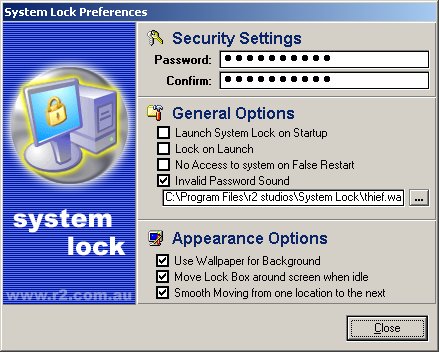
System Lock contains numerous Options for security and appearance. It also has a unique protection system in that, if your computer is restarted or a power failure causes your machine to reboot, System Lock will automatically lock the system on restarting, so that you computer will remain locked. This option is of course only an option, and every user may not need this option.

Upon System Lock Launching it will automatically minimize into the System Tray, ready for activation. If you simply double click on the icon, it will lock the system for you. Right clicking on it will bring up a context menu allowing you to open the prefrences Dialog, or Unload it from memory.

If you add the paramater '/QUICKLOCK' without the quotes to the end of your shortcut, System Lock will lock straight away and when the correct password is entered it will unload itself from memory.

Warning: System Lock can be VERY EASILY bypassed in Windows NT, 2000 and XP. It is NOT RECOMMENDED that you use System Lock with these operating systems

FAQ


Ctrl+Alt+F9 doesn't work!


If Ctrl+Alt+F9 doesn't work for you, it may be because you have a keyboard that has an 'F Lock' or a 'Function Lock' key. If you have one of these, press the F Lock key to disable it and then try the key combination again.


Known Issues

The tooltip for 'Show Shutdown Button' is the same as the one for System Wallpaper. The tooltips for Stretch, Tile, and Center are the same as the ones for System Wallpaper, Custom Wallpaper and None.